
Manual mode
Every Manual-mode check explained — what each one catches and when to turn it on.
Manual mode replaces the AI's "all-or-nothing" decision with individual toggles you control. Switch Detection Strategy to Manual and three new cards appear: Technical Threats, Behavioral Patterns, and Ad Quality. Each toggle maps to one specific check. This page covers every one.
Most accounts don't need Manual mode. Use it only if Automatic at Recommended is mis-flagging traffic you can specifically identify as legitimate — then turn off only the offending check.
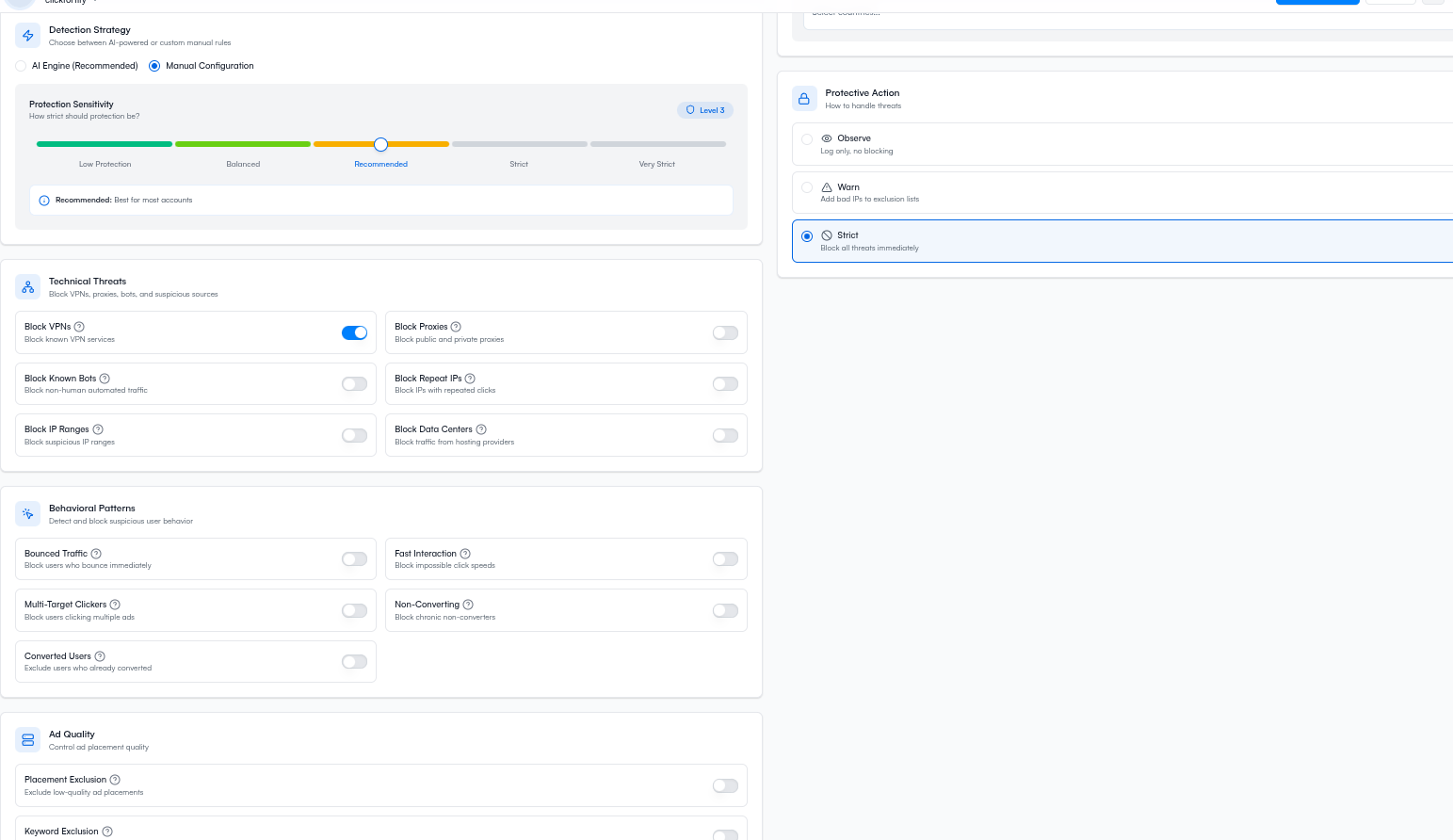
Technical Threats
Network and device checks. They fire fast and have low false-positive rates.
Block VPNs
Catches: Traffic from known VPN endpoints (NordVPN, ExpressVPN, corporate VPNs, etc.).
Turn this on when: Your buyers are unlikely to use a VPN to reach you. Most consumer ecommerce, local services, lead gen.
Turn this off when: Your audience is corporate or technical (B2B SaaS, infosec, developer tooling) where VPN use is normal.
Block Proxies
Catches: Traffic routed through known public proxy servers.
Turn this on when: Almost always. Public proxies are rarely used by real customers.
Block Known Bots
Catches: Traffic matching ClickFortify's bot signature list — known crawlers, scrapers, automation tools.
Turn this on when: Always. Even legitimate bots shouldn't be clicking your paid ads.
Block Repeat IPs
Catches: The same IP coming back more often than a real customer would.
Turn this on when: Consumer-facing campaigns. One IP clicking 5+ times in a short window is almost always suspicious.
Turn this off when: Most traffic comes from shared networks (offices, schools, mobile carrier NAT) where many real users come from a single IP.
Block IP Ranges
Catches: Suspicious patterns at the CIDR level — whole network ranges showing repeated bad behavior.
Turn this on when: You see clusters of fraud from related IPs in the Exclusions page.
Block Data Centers
Catches: Traffic from cloud hosting (AWS, GCP, Azure, etc.). Real users don't browse from server IPs.
Turn this on when: Almost always. Data center traffic is overwhelmingly automation.
Turn this off when: You explicitly target a developer audience that may use cloud workstations.
Behavioral Patterns
Post-click behavior checks. They take a few seconds to fire but catch fraud that survives Technical Threats.
Bounced Traffic
Catches: Sessions that leave immediately after landing — no scrolling, no clicks, no interaction.
Turn this on when: Your landing pages take more than a glance to evaluate.
Fast Interaction
Catches: Visitors who interact (click, submit) impossibly fast after page load. Classic bot tell.
Turn this on when: Always. Real humans need at least a second or two to find a button.
Multi-Target Clickers
Catches: Same identity (IP/device/fingerprint) clicking multiple of your campaigns in quick succession.
Turn this on when: You run more than one campaign at a time. Real customers don't click across campaigns within minutes.
Non-Converting
Catches: Repeat visitors who keep clicking ads but never convert.
Turn this on when: Conversion tracking is installed and your sales cycle is short enough that a repeat visitor should have converted by now.
Turn this off when: High-consideration products where prospects may research for weeks before buying.
Converted Users
Catches: Visitors who already converted and shouldn't be seeing your ads again.
Turn this on when: One-conversion-per-customer businesses (most B2B, SaaS, big-ticket).
Turn this off when: Repeat-purchase items (consumables, subscriptions, regular renewals).
Ad Quality
Placement Exclusion
Catches: Display Network placements (sites and apps) that consistently send low-quality traffic.
Turn this on when: You run Display Network or Performance Max campaigns. The Display Network has much higher invalid-traffic rates than Search.
How to use this page
What happens next
- Automatic mode reference — if you'd rather not manage individual checks
- Settings — back to the decision page