
Conversions
Conversion attribution after fraud is filtered out — timeline, by-campaign breakdown, funnel, and geographic distribution.
The Conversions page is your view of what's actually working. It ties every conversion back to the ad click that delivered it, so you can see which campaigns drive real outcomes after fraud is filtered out.
This page is empty until conversion tracking is set up. Start at Set up conversion tracking.
Prefer to watch?
This 4-minute tutorial covers what a conversion is, why it matters for protection and automations, how to set up a Zero-Code Conversion Rule, and how to read every panel on this page — conversions, rate, value, timeline, funnel, and by-campaign.
What counts as a conversion
A conversion is any valuable action a visitor takes after clicking your ad:
- Submitting a contact or lead form
- Completing a purchase (landing on an order-confirmation page)
- Clicking a phone number or call button
- Signing up for a free trial
- Booking an appointment
The conversions shown here come from the rules and snippet you set up in Set up conversion tracking.
Why see conversions here vs. just in Google Ads
Google Ads tracks conversions, but it doesn't know which clicks were fraudulent. ClickFortify ties each conversion to the original click record, so you get:
| Insight | What it tells you |
|---|---|
| Conversions by campaign | Which campaigns drive real results after fraud is filtered |
| Clean-traffic conversion rate | The rate that matters — what your ads convert when bots aren't in the mix |
| Conversion-side fraud | Anomalous-timing flags, bots that "converted", refund-abuse patterns |
| Auto-whitelist | Trusted IPs from real conversions (14-day window) — protects converting customers from accidental blocking |
How conversion matching works
When someone clicks your ad, ClickFortify creates a click record with a session ID. When the same visitor completes a conversion event on your site, the conversion fires and sends the session ID back. ClickFortify matches them and attributes the conversion to the original click — including campaign, ad group, and ad.
The four analytics panels
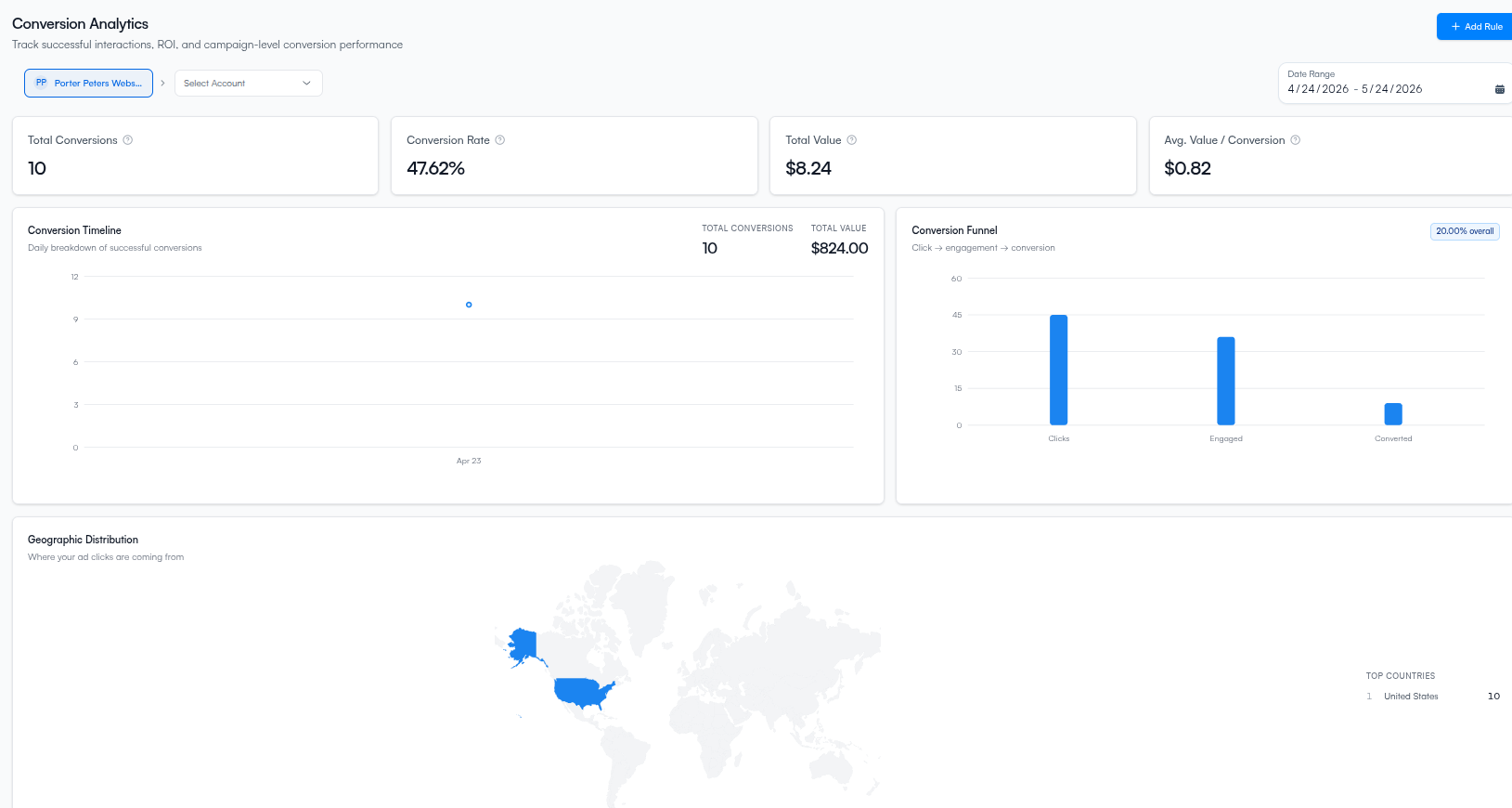
Conversion Timeline
A day-by-day chart of conversion volume and value across the date range. Use it to spot drops that line up with fraud bursts or campaign changes.
Conversions by Campaign
| Column | Meaning |
|---|---|
| Campaign | Google Ads campaign name |
| Clicks | Total clicks for that campaign |
| Conversions | Confirmed conversion count |
| Rate | % of clicks that converted |
| Conv. Value | Total monetary value (if you pass values via CF.conversion) |
A high click count with zero conversions on a single campaign is suspicious — usually a sign of campaign-level fraud worth tightening protection on.
Conversion Funnel
Three stages: Clicks → Engaged → Converted. Shows where visitors drop off between clicking the ad and converting. Drops at the Clicks → Engaged stage often indicate fraud (visitors who never engaged with the page).
Geographic Distribution
Conversions by country, region, and city. Cross-reference with the Main Dashboard's geographic map — regions that send clicks but no conversions are a common fraud signal.
Filters
Date range, ad account, and campaign filters at the top of the page focus the view.
Conversion fraud detection
Every conversion is checked. These flags appear on the click record:
| Flag | What it means |
|---|---|
| Anomalous timing | Less than 2 seconds between click and conversion — too fast for a real user |
| Bot converted | The click was already classified as bot traffic before the conversion fired |
| Repeat converter | Same device has 3+ conversions — possible refund-abuse pattern |
Auto-whitelist
When a real conversion is recorded, ClickFortify trusts that visitor's IP for 14 days. Real customers in the middle of their journey are never accidentally blocked because they re-clicked an ad.
What happens next
- Reports — export conversion data for spreadsheet analysis
- Set up conversion tracking — if this page is empty
- Click Traffic — to drill into individual converting clicks