
Install via Google Tag Manager
Sign in with the Google account that owns your GTM container and ClickFortify publishes the tracking tag for you.
If your site already uses Google Tag Manager, ClickFortify can create and publish the tracking tag inside your GTM container for you. No editing your site's HTML.
Authorize Google Tag Manager
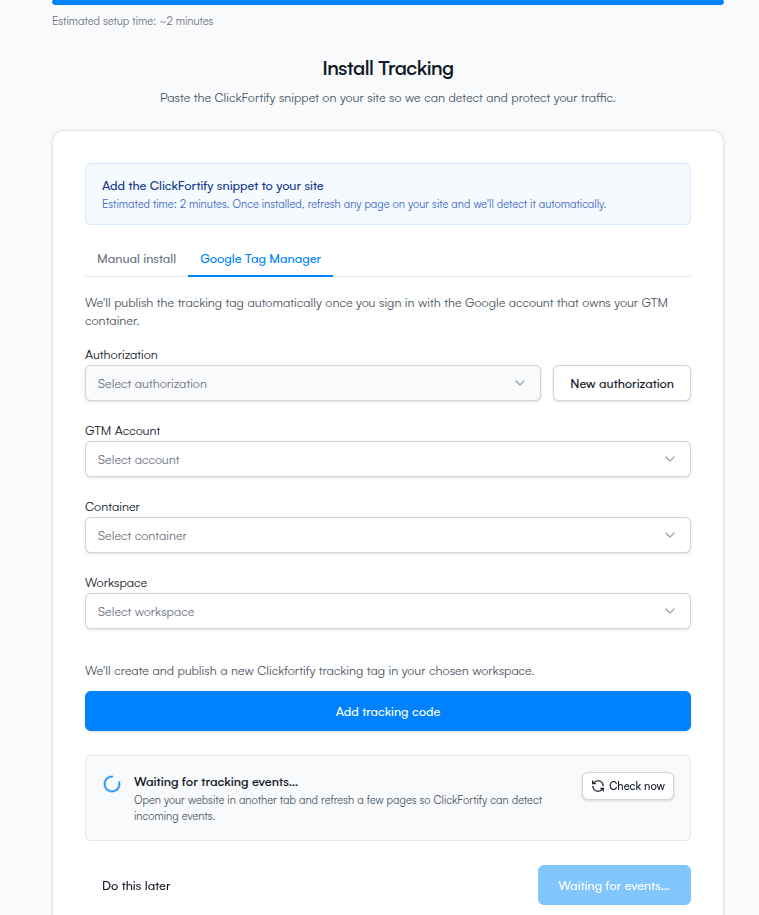
Pick your account, container, and workspace
After authorization, three dropdowns appear in sequence. Each one populates after you pick the one above it.
If you don't see your container, it means the Google account you signed in with doesn't have access to it. Sign out, sign back in with a Google account that has admin or edit access on the container, and try again.
Publish the tag
Confirm it's working
Open your site in another browser tab and refresh a page. Within ~3 seconds the wizard's status banner at the bottom of step 5 turns green and reads Tracking successfully connected.
If it stays on Waiting for events…, GTM may need a moment to roll the new version out to your site, or the container snippet itself may not be installed on the site yet. See Auto-detection and troubleshooting.
What happens next
- What the auto-detection is doing
- Or continue to the dashboard once detection succeeds