
Install via manual snippet
Copy the ClickFortify snippet from the wizard and paste it before your site's closing </head> tag.
The manual install is one copy-paste into your site's <head>. The wizard auto-detects it within a few seconds of you loading a page on your live site.
Copy the snippet
On step 5 of the wizard, make sure the Manual install tab is selected (it's the default).
Click Copy in the top-right corner of the snippet code block. You'll see "Copied" briefly appear in place of the button label, and a toast message confirms the snippet is on your clipboard.
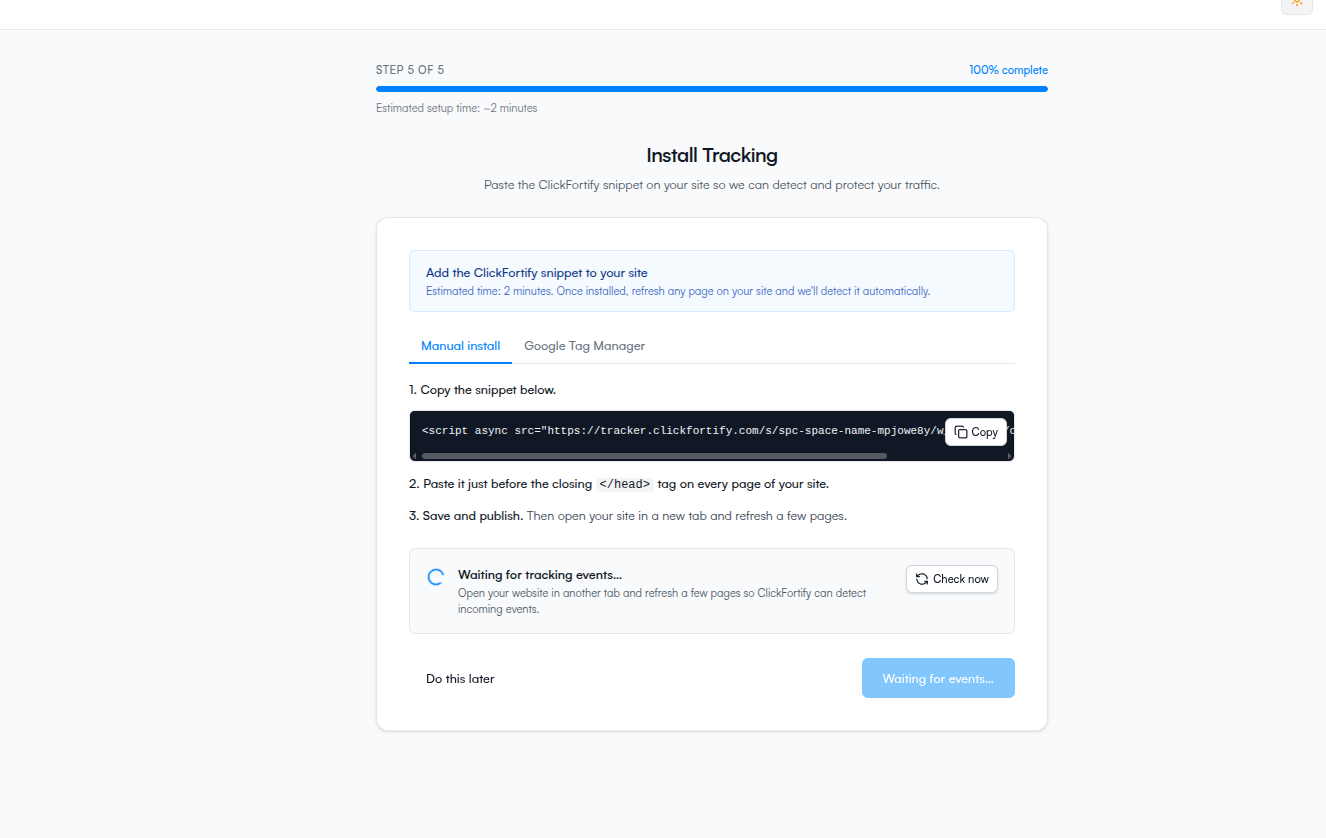
Paste it before </head>
Open the file or template that controls your site's
<head> tag. On most sites this is the main layout file, a header partial, or the theme's head.html.Find the closing
</head> tag near the top of the file.Paste the snippet on the line immediately above it. Save the file.
Save and publish
Push or deploy the change so it's live on your real site, then open your site in another browser tab. Refresh the page once. That triggers the pixel to fire and lets the wizard see it.
Confirm it's working
Back in the wizard, within ~3 seconds the status banner at the bottom of step 5 turns green and reads Tracking successfully connected. The Continue to dashboard button activates.
If it stays on Waiting for events…, see Auto-detection and troubleshooting.
What happens next
- What the auto-detection is doing
- Or continue to the dashboard once detection succeeds